

If Auto Apply Oils isn’t working in The Witcher 3: Wild Hunt Remastered, it doesn’t mean you’re doing something wrong. Players have found that loading a save can disable this useful feature even though Automatically Apply Blade Oils still appears to be turned on in the settings.
For now, the easiest workaround is surprisingly simple: turn Automatically Apply Blade Oils off and then back on again after loading your save. Several players report that this gets Auto Apply Oils working again, but you may have to repeat it whenever you reload or die.
If you’re a PC player, there’s also an unofficial Auto Apply Oils – Fix (Remastered) mod on Nexus Mods that addresses the problem more persistently.
Table of Contents
How to Fix Auto Apply Oils Not Working in The Witcher 3 Remastered
If Auto Apply Oils isn’t working for you, I’ve found a way that a lot of frustrated players like me have used and it has worked for them. You should turn Auto Apply Oils off and then back on again. You may have to do this every time you reload the game.
I have to reiterate that this is not a permanent fix and it might not work for you at all. From what I’ve experienced and found, it works for a lot of players right now.
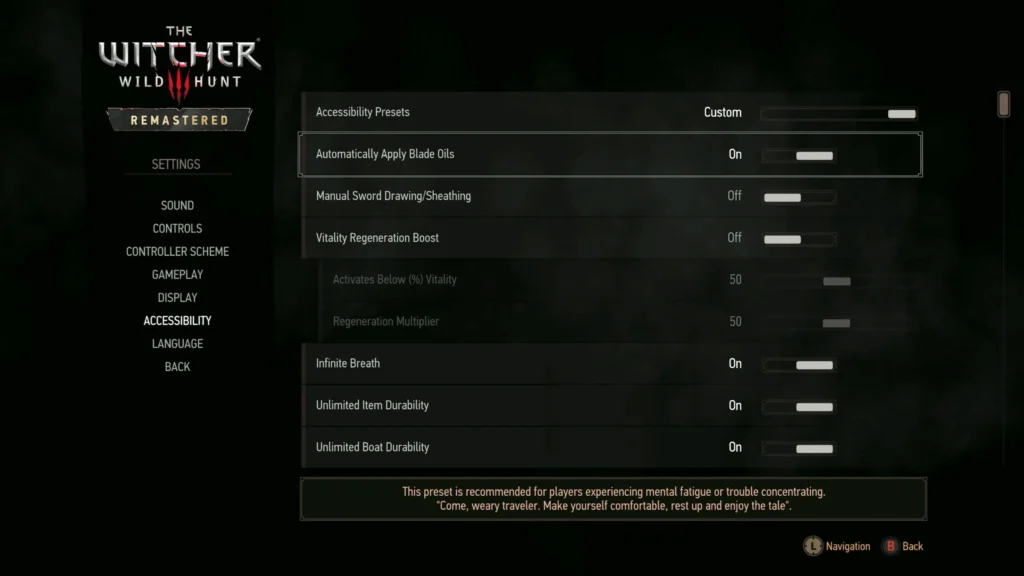
To turn off Auto Apply Oils, go to Options > Accessibility > Automatically Apply Blade Oils and turn the option off. Then turn it back on again. For me, it worked, but after I died to a freaking Drowner and reloaded the game, Auto Apply Oils seemed to stop working for me again.
I dug a little deeper and found out that each time you reload the game, there’s this bug that causes Auto Apply Oils to stop working. So you have to turn it off and back on every time.
Why Does Auto Apply Oils Stop Working After Loading a Save?
Auto Apply Oils isn’t a new Remastered feature. CD Projekt Red officially added the option to automatically apply oils in combat with Patch 4.03 all the way back in May 2023.
What changed in the Remaster, though, was that the update introduced a new Accessibility section in the Settings menu and moved existing accessibility-related options there.
The interesting part is that there seems to be an explanation for this as well. According to what the creator of the Auto Apply Oils – Fix (Remastered) Nexus mod says, the menu change is probably the source of all of this. After they examined the Remastered scripts, the mod author found that the Auto Apply Oils option had moved from Gameplay to Accessibility, but the code used when loading a save was still checking its old Gameplay location.
As a result, the author says Auto Apply Oils gets switched off internally every time a save loads. When you toggle it off and on manually, it makes the game read it correctly again until the next load. That’s pretty much it.
This explanation, of course, hasn’t been officially confirmed by CD Projekt Red, but it seems like it matches what players, myself included, are saying on social media.
Is There a Permanent Auto Apply Oils Fix in The Witcher 3 Remastered?
If you’re a PC player, then you have the option of using a mod (if you’re a fan) and in this particular case this makes a lot of sense. There’s an unofficial community fix on Nexus Mods called Auto Apply Oils – Fix (Remastered). What this mod does, instead of replacing the vanilla files, is re-read the Auto Apply Oils setting from the correct location before the game checks it.
Therefore, the author says you don’t need Script Merger and to top it all off it can be added or removed during your playthrough. The mod was tested on PC version 5.00c, which sounds promising.
If you’re not into mods or if you’re a console player, the main workaround right now is to toggle Automatically Apply Blade Oils Off > On whenever you reload the game or when it seems Auto Apply Oils doesn’t work for you.
Did Hotfix 5.00c Fix Auto Apply Oils?
No official Auto Apply Oils fix is listed in Hotfix 5.00c, released for PC on October 1, 2026. The update fixed a plethora of Remastered problems, including saves, audio, visuals, HairWorks, telemetry settings, achievements, and launching the Classic version, but Auto Apply Oils isn’t one of them. CD Projekt Red also said it was continuing to investigate issues reported by players.
So, for now, if Witcher 3 Remastered Auto Apply Oils stops working, try toggling the Accessibility option off and then back on. On PC, the Nexus community fix is currently the more persistent alternative.
But at the end of the day, if you don’t want to use the mod, or if you’re a console player and this on-and-off workaround isn’t working for you, your best bet is to wait until there’s an official update that fixes it.

The Witcher 3: Wild Hunt