

If you own an AMD graphics card and went looking for FSR in The Sinking City 2’s settings, you already know it isn’t there. You’re not missing a menu and your game isn’t broken. Here’s what actually happened, and how to get your FSR running anyway.
In This Guide:
Does The Sinking City 2 Support FSR?
No. The retail version of The Sinking City 2 has no official AMD FSR support at launch. The reason is the engine. The full game runs on Unreal Engine 5.8, and AMD hasn’t released its FSR plugin for that version yet.
A Frogwares developer also explained why they can’t just go back to 5.7. Once a project moves to a newer engine version, rolling it back isn’t realistic. He added that the studio expected AMD’s new plugin to arrive before launch.
How to Get FSR Working on The Sinking City 2
Two community workarounds are already doing the job. Both come from players on the Steam forums, not from Frogwares.
Method 1: Radeon Super Resolution (Easiest)
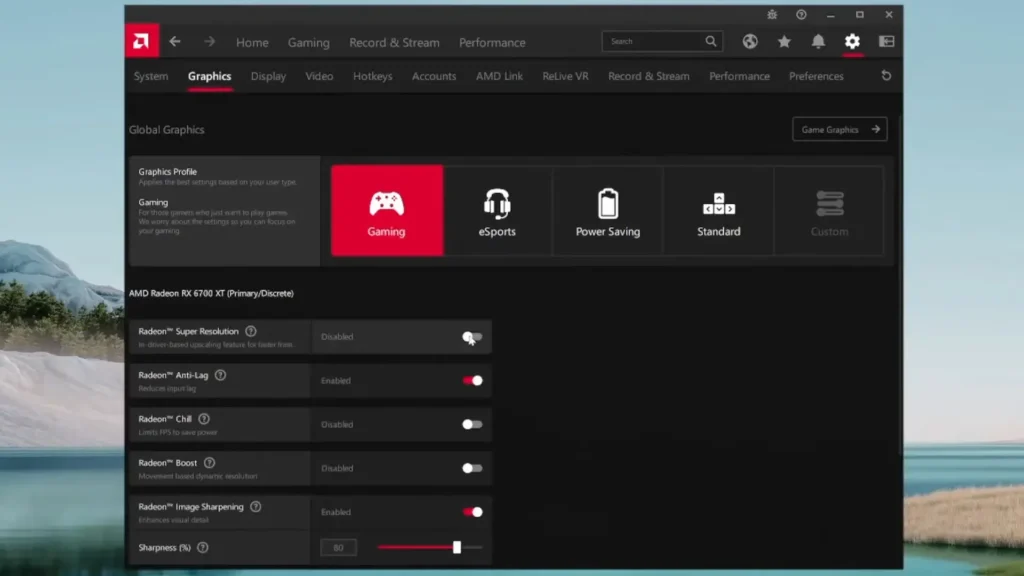
RSR is AMD’s driver-level version of FSR. It does the same upscaling job, it just runs globally instead of being built into the game. Here’s the process:
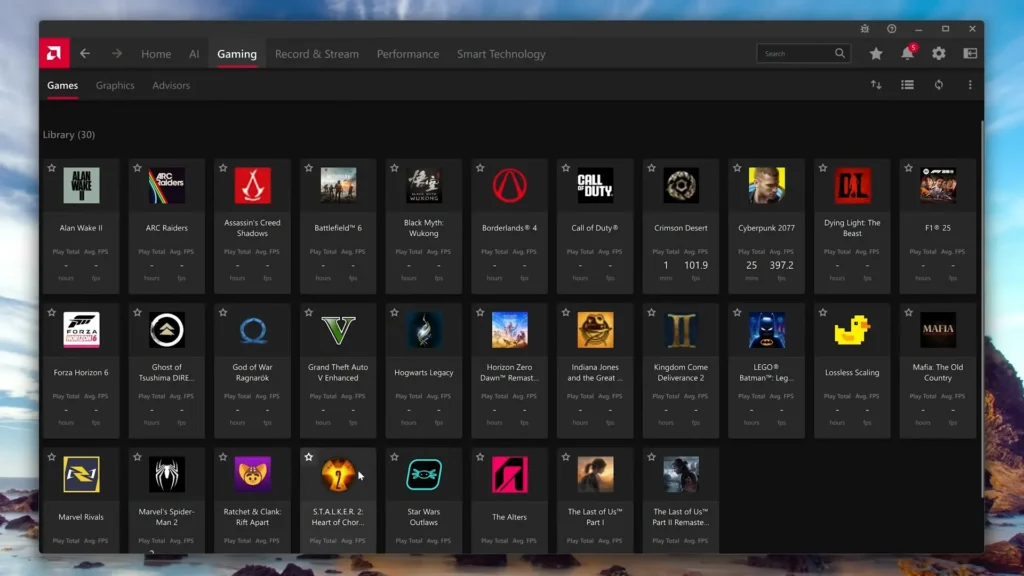
- Open AMD Adrenalin and go to Gaming.
- Find The Sinking City 2 in your game list.
- Enable Radeon Super Resolution.
- In the game, set your resolution one step lower than your screen resolution.
- Set the in-game Upscaler option to None.
That last step matters. If you leave TSR on, RSR won’t kick in properly and the picture will look muddy. RSR then detects the lower resolution and upscales it back up for you.
The trade-off is that this gives you older FSR quality, not FSR 4.
Method 2: OptiScaler (For FSR 4)
If you specifically want FSR 4.1, players are using OptiScaler, a third-party tool that redirects one upscaler to another. One user reported it working with no issues:
- Drop the OptiScaler DLL files into the game’s binary folder: SteamLibrary/steamapps/common/The Sinking City 2/PlayGround/Binaries/Win64/
- Select DLSS in the in-game settings.
- Choose FSR4 in the OptiScaler menu.
Another player got stuck here because DLSS wasn’t appearing in his settings at all. He kept at it and eventually got it running, and said it looks great. So if the option isn’t showing up for you, it’s usually a setup issue rather than a dead end.
What Frogwares Recommends Instead
If you’d rather not touch any of this, Frogwares tells AMD users to stick with TSR, Unreal’s built-in Temporal Super Resolution. It works on any GPU. DLSS 4.5 and Frame Generation are in the game too, but those are NVIDIA only, and Frame Generation needs an RTX 40 or 50 series card.
When Is FSR Coming to The Sinking City 2?
Frogwares says FSR will be added as soon as AMD’s plugin is ready. Nobody has given a date. AMD usually updates its plugin within a few months of a new engine release, so “sometime soon” is the honest answer.
One last warning. Don’t mix this up with The Sinking City Remastered, which does support FSR. Different game, different engine build.
I don’t have AMD graphic card but I researched everywhere for a solution for those of you who have. Have you managed to get The Sinking City 2 FSR working? Tell us about your experience in the comments.