

Resonance: A Plague Tale Legacy stuttering has been the biggest complaint since its release. The confusing part is that it’s not one simple performance problem. Steam and Epic copies run a shader pre-compile pass at the main menu; the Xbox and PC Game Pass build skips that step entirely. Focus Entertainment has confirmed it’s a bug, but there’s no patch for this trending game yet. But here’s what you can do about it right now.
What You’ll Read:
Why Is Resonance A Plague Tale Legacy Stuttering
The split comes down to two words: shader compilation. On Steam and Epic, launching the game increases CPU usage to 100% at the main menu for a few minutes while it pre-compiles shaders. Sit through that, and gameplay runs smoothly. The Xbox and PC Game Pass build never does this. The CPU is idle at the menu, and the game stutters badly from the first area onward. And the problem is not your hardware. People have reported this with an RTX 5070 and 5090.
Focus Entertainment’s community rep confirmed it on the Steam Bug Reports forum, replying to a bug thread with three words: “That shouldn’t happen.” That’s an acknowledgment that it’s a bug, not a root-cause explanation. He asked for crash logs and a video clip and gave no ETA.
Shader Stutter vs. Traversal Stutter
Not every stutter here is the same bug, and if you mix them up, you will do the wrong fix. Run this test to find out: does the hitch happen once in a spot, then never again if you walk back through? That’s shader compile stutter. It’s Game Pass-specific and goes away for good once that area’s shaders are cached.
Does it happen every single time you enter the same area, even on repeat visits? That’s traversal or streaming stutter, and it shows up on Steam too. One Steam player put it plainly: stutters on new area loads, every time, no shader compiling involved.
So if you’re on Steam and still getting hitches, don’t assume the fix above failed. Check which pattern you’re seeing first.
How to Fix Stuttering on Steam and Epic Games Store
The fix here isn’t really a fix; it’s patience! Boot the game and just sit at the main menu for a few minutes before hitting start. There’s no progress bar, so you won’t see it happening, but your CPU usage will spike to 100% while it works through the shader cache. One player only caught on because his case fans speed up to what he called “shader-compile speed.”
If you skip this step and start playing right away, you’ll get rough, stuttery performance at the outset, even on Steam. Four separate players across two forums confirmed the same result: wait it out at the menu first, and beyond the occasional traversal hitch, performance is otherwise smooth.
Is There a Fix for the Xbox/PC Game Pass Stutter
Not yet. As of this writing, no patch or update addresses the missing shader pre-compile step on Game Pass. Focus Entertainment has the bug report and asked for logs, but hasn’t confirmed a cause or committed to a timeline.
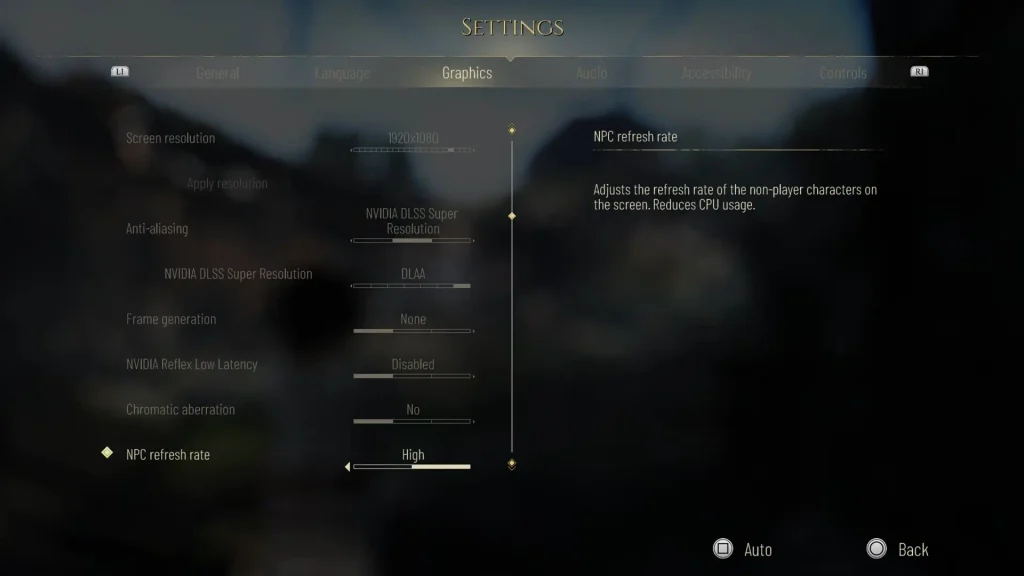
The workaround making the rounds is enabling DLSS alongside AMD frame generation. One player on a Ryzen 7 7800X3D and RTX 5090 said it’s “really playable now,” with just occasional stutters left. But it’s worth being honest about what this actually does: it changes frame pacing enough to hide the problem; it doesn’t compile the shaders the game is missing. The first reply in that same thread pointed out that a 5090 shouldn’t need frame generation to run this game at all, and it has no ray tracing to justify it.
If waiting isn’t an option, try it. Just don’t expect it to fix the underlying issue.
Other Stuttering Fixes (V-Sync and Driver Updates)
If your V-Sync toggle is greyed out and you’re getting screen tearing, set your framerate limit to Unlimited first. The V-Sync option unlocks right after. A Steam user confirmed this works after testing it himself.
On drivers: NVIDIA’s GeForce Game Ready 616.56 WHQL, released August 26, 2026, added Game Ready support for this title alongside DLSS and RTX features. It’s worth installing for the usual reasons, like bug fixes for other games and official support for this one.
But don’t expect it to solve the Game Pass stutter. Multiple players on the newest drivers reported stuttering anyway, and one entire Steam thread built around “update your drivers” got shut down by its own replies. A driver can’t compile shaders the game never asks it to compile.
Steam Deck and Handheld Performance
Steam Deck HQ found the game holds 30 FPS through most of a playthrough, but specific areas spike CPU usage and stutter regardless of settings (lowering graphics doesn’t help because it’s a CPU bottleneck, not a GPU one). Textures on Medium is about the only real headroom.
The bigger problem is a hard crash right after the Chapter 9 cutscene. It reproduced on a Steam Machine too, so it’s not a Deck quirk, likely a CPU/GPU spike that could hit low-end desktops as well. Sometimes reloading picks up right where you crashed, and sometimes it loops.
Worthplaying’s review paints a rougher picture: ~25 FPS on default Deck settings (Low preset, FSR frame generation) and about 90 minutes of battery. The gap between the two reviews comes down to settings: Steam Deck HQ used a manually capped, tuned config, while Worthplaying tested the game’s own defaults.
Have you discovered a fix for Plague Tale Resonance stuttering yourself? Do the Lord’s work and share them with us in the comments.
FAQ
Does the stuttering affect PS5 or Xbox Series X consoles?
No console-specific reports have turned up in current coverage. Every source documenting this bug is testing PC storefronts such as Steam, Epic, and the Xbox/PC Game Pass app.
Should I just buy it on Steam instead of Xbox/PC Game Pass?
It’ll skip the shader-compile bug, yes. But Steam still has traversal stutter on area loads, so it won’t be a perfectly smooth experience either.




Great article
Was struggling with this myself
I was able to get this to play OK on the 5090 with the Xbox gamepass but for some reason it required boarderless fullscreen (game is set to fullscreen by default) and Vsync turned on to get rid of the horrific screen tearing and out of sync feel.
Playing 60fps DLAA all maxed out and had no issues playing fluidly with these settings
Only utilizing around the 50% of the GPU though so could be pushing for more frames but gotta give the developers credit for good optimization at least
Hey Alexius, I’m happy it helped you fix the darn bug. And yeah, I totally agree. The developers really outdid themselves.