If you are building your first underwater base in Subnautica 2, the Power Transmitter is the piece that unlocks flexible, long‑distance power grids. It lets you connect remote generators like Hydroelectric Turbines and Thermal Plants back to your habitat. Therefore, you never have to place fragile base modules directly in dangerous currents or magma vents.
In this guide you will learn how to unlock the Subnautica 2 Power Transmitter, craft it and connect it to your base using the most efficient methods.
Table of Contents
What the Subnautica 2 Power Transmitter Does
The Power Transmitter (often called a “power node” in the base‑piece wikis) is a wireless energy relay that carries power from one source or another transmitter to your base. It does not generate power itself. It extends the range of your turbines, solar panels and Thermal Plants so you can keep your base safely anchored away from extreme biomes.
Each Power Transmitter can:
- Pull power from a nearby generator (within ~10–20 m).
- Send that power to another transmitter within a longer range (up to roughly 50–100 m, depending on placement).
- Feed directly into any base module when the final node snaps onto the exterior of your habitat.
If you see your base’s total power bar jump as soon as you place the last node against the hull, the system is working correctly.

How to Unlock the Power Transmitter Blueprint
Before you can craft them, you need the Power Transmitter blueprint. In Subnautica 2, blueprints are typically unlocked by scanning specific devices or base pieces in the world. The Power Transmitter is usually obtained by:
Scanning a Power Transmitter fragment or completed node.
Scanning a Hydroelectric Turbine or Thermal Plant base piece, which may unlock related power‑grid components.
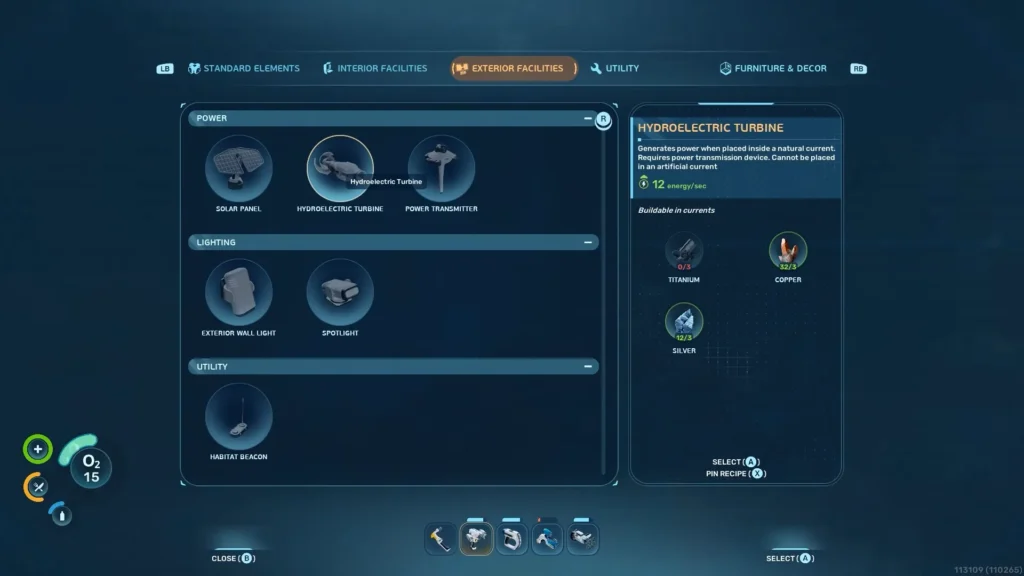
Once scanned, the item appears under the Power category in your Habitat Builder.
Power Transmitter Crafting Recipe
The Power Transmitter is a relatively cheap mid‑game piece designed to be placed in quantity along your energy lines. Use the following recipe:
- 1 × Titanium
- 1 × Copper
This low‑cost formula makes it easy to chain multiple nodes from a remote generator all the way to your base, even if you only have limited resources early on.
Why Your Base Needs Power Transmitters
Without Power Transmitters, your base power is limited to Solar Panels on or near the base (only effective during the day) and bioreactors or similar generators placed inside the habitat (which require constant fuel).
These setups are fine for early survival, but they fall short when: You want to oxygenate your base at night without relying on solar dips. Or you want to scale up to higher‑tier generators that must be placed outside your habitat, such as:
- Hydroelectric Turbines in strong currents.
- Thermal Plants in hot vents.
Power Transmitters solve this by bridging the gap between those external sources and your base interior.

How to Connect a Power Transmitter to Your Base
Setting up a Power Transmitter chain is simple if you follow these steps:
Place a Compatible Generator
First, build your remote generator where it can generate power. For Hydroelectric Turbines, place them directly in strong water currents (wide, light‑blue waves that push you through).
For Thermal Plants, place them in hot zones such as magma vents or geothermal vents.
If the turbine displays “0” or “12,” only keep it where the number is 12 and green; anything else means it is not on the current.
Start the Transmitter Chain
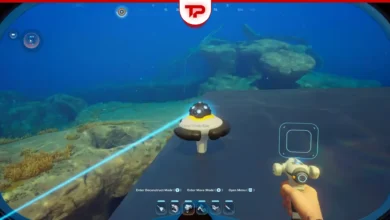
Switch to the Habitat Builder, select Power Transmitter and place the first node close to the generator so a blue or white connection line appears.
If no line shows, move the node slightly until it snaps into range.
This first node “locks onto” the source; every node after that will inherit that power as long as the chain stays connected.
Chain Transmitters to Your Base
From the first node, continue placing Power Transmitters in a line. Each new node should be within visible range of the previous one, so the blue line connects continuously.
You can place nodes in open water or near structures. They do not need a solid surface as long as they snap into the grid.
It is best practice to work from the generator toward your base, not the other way around, to avoid accidentally sending base‑generated power back into the void.
Connect to the Base Exterior
When the chain reaches your habitat, place the final Power Transmitter node so it snaps onto the outside of any accessible base module (corridors, walls, or crevices).
As soon as it attaches, your total power bar should increase and the base’s oxygen and life‑support systems will stay stable as long as supply > demand.
If you hover over the node and the connection line disappears, the node is not properly linked. Reposition it until the line returns.

Power Transmitters with Hydroelectric Turbines
Hydroelectric Turbines are one of the best mid‑game power sources because they provide a flat 12 energy/sec so long as they are placed in the right current and they never need fuel. To use them with Power Transmitters:
- Craft Hydroelectric Turbines (3 × Titanium, 3 × Copper, 3 × Silver each) and place them where the number reads 12.
- Build Power Transmitters in a chain from the turbines to your base.
- Attach the last node to the base exterior and watch the power bar stabilize.
- Locate a strong current (blue‑wave tunnel) near your base.
Stacking multiple turbines in the same current can give you enough power to run multiple base modules, life support and even more advanced tools.
Power Transmitters with Thermal Plants
Thermal Plants generate power from heat, so they must live in hot biomes like magma vents or geothermal zones. Because these areas are dangerous, you almost always place Thermal Plants outside your main base and connect them via Power Transmitters.
Drop a Thermal Plant where the ambient temperature is high enough (around 60–65°C or more for good output). Place the first Power Transmitter next to the plant.
Chain more transmitters back to your base. Attach the final node to the base exterior to start feeding thermal power into your habitat. Once connected, the plant will keep producing power as long as it stays in the hot zone.
Tips for a Stable Power Grid with Power Transmitters
To keep your Subnautica 2 base reliably powered without constant micromanaging, consider these best‑practice tips:
- Layer your power sources: Combine Solar Panels (day), Hydroelectric Turbines (constant) and Thermal Plants (hot‑zone) so one system covers when another dips.
- Keep the chain visible: Always watch for the blue/white connection lines between nodes. If a line breaks, reposition or add another transmitter.
- Start near the generator: Build the first Power Transmitter as close as possible to the energy source, then extend toward the base instead of the other way around.
- Monitor the HUD power bar: Use the top‑left energy display (blue bar) to confirm your total input exceeds demand so your base stays oxygenated and safe.
Troubleshooting: Subnautica 2 Power Transmitter not Connecting to Base
Move the power transmitter lower or reposition it until it locks onto the base using a different connection mode. Otherwise, it will remain in the “floating” state typically used for intermediate transmitter nodes.
Subnautica 2 Power Transmitter: A Must-have Tool for You!
The Subnautica 2 Power Transmitter is less of a “gadget” and more of a core infrastructure block. It is the reason you can leave your base safely anchored in calmer water while your generators hum in deadly currents or boiling vents.
By learning where to place it, how to chain it and how to combine it with Hydroelectric Turbines and Thermal Plants, you can build a power grid that keeps your habitat oxygenated, your machines running and your next deep‑sea dive well‑prepared.
We offer a wide range of guides for trending games on Tpose Gaming, so feel free to explore and find what you need. If you have any questions or need help, do not hesitate to leave a comment.