

WARDOGS hit Early Access on September 10, and even now, a good chunk of players still can’t finish a match without a crash. This can ruin your game, especially in crtical moments like shooting an Artillery. Most of it isn’t the game’s fault. One Windows update will fix the majority of them. Here’s every fix that works, sorted by what’s actually causing it, so jump to your War Dogs crashing pc fix and skip the rest.
Disclaimer: WARDOGS is still in Early Access, so fixes move with each patch. Check again later.
WARDOGS Crashing on PC Quick Fixes
Here are the quick answers you are looking for, so you wouldn’t have to read the whole article:
| What you’re seeing | Where the problem is | First move |
|---|---|---|
| Crash after shader compilation, 0xC0000005 | Windows driver | Windows fix below |
| Full BSOD, INVALID_KERNEL_HANDLE | Windows driver | Stop playing, then Windows fix |
| 0xc0000142 at launch | Easy Anti-Cheat | Repair EAC, clean boot |
| 1147405308 “failed to authenticate” | Server | Check your Build ID, then wait |
| 1628505085 “failed to initialize player session” | Server | Wait it out, don’t reinstall |
| Stuck on Compiling Shaders | Local cache | Clear the shader caches |
| Empty server browser | Server | One region, then refresh |
Check This First: Is It Actually a Crash
During the beta, community trackers logged roughly 1,000 reports in 24 hours, and only about 6% were actual crashes or freezes. Almost everything else was connection, sign-in, or matchmaking failure, and launch week has followed the same shape.
If you’re stuck on a loading screen, sitting in a queue, or getting bounced with a code like 1147405308 or 1628505085, that’s server-side, and nothing you do to your PC will touch it. Keep reading if the game is genuinely freezing or closing itself.
The Windows Update Behind Most WARDOGS Crashes
Microsoft’s KB5121003 update, released August 11, was crashing games for weeks. Symptoms: apps closing without warning, freezing, EXCEPTION_ACCESS_VIOLATION errors, and full device restarts. Embark Studios traced it to inpoutx64.sys, a kernel-level driver that RGB and peripheral software like Razer Synapse quietly installs in the background. WARDOGS runs kernel-level Easy Anti-Cheat and its shader crashes throw the exact same EXCEPTION_ACCESS_VIOLATION, which is how it ended up in the same net.
Microsoft closed its investigation on August 27 and released a fix: a compatibility block that stops inpoutx64 from loading. Work down this list and stop when the game launches.
- Run Windows Update and restart. The block goes out automatically to consumer PCs and can take up to 24 hours to land. When it applies, Windows tells you the driver has been disabled, and the game launches normally.
- Still crashing after a restart? Remove the driver yourself. Open Command Prompt as administrator, run
sc stop inpoutx64, thensc delete inpoutx64, then deleteC:\Windows\System32\drivers\inpoutx64.sysand reboot. - On a work or school PC? Managed devices don’t get the automatic block. Open regedit, go to
HKLM\SYSTEM\CurrentControlSet\Services\inpoutx64, setStartto 4, restart.
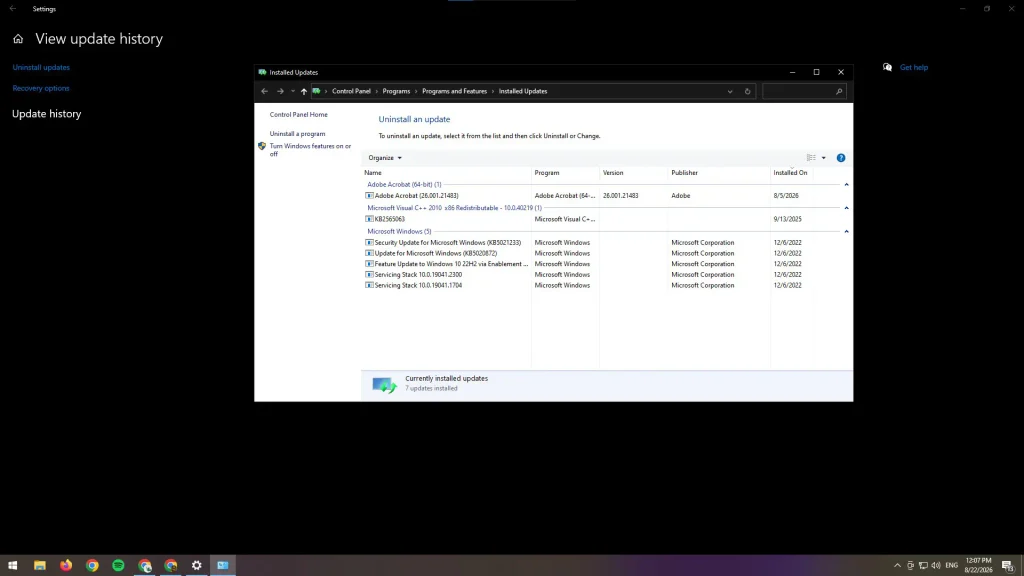
Don’t uninstall KB5121003. That was the beta-week answer, and it isn’t the right call anymore. It strips 400+ security fixes, Windows reinstalls it anyway, and the block does the same job without the tradeoff. One side effect either way: disabling the driver can kill your RGB lighting controls.
Microsoft’s final word is that the update didn’t break the driver so much as expose a conflict that was already sitting there. The fix is the same either way.
Crash on Shader Compilation (0xC0000005)
This is the most reported crash on the Steam board. Symptom: WARDOGS crashes right after shader compilation finishes, throwing an “Unexpected Error” popup. Dump files consistently show 0xC0000005 EXCEPTION_ACCESS_VIOLATION, faulting at platformcore.dll, which is the same signature Microsoft flagged in KB5121003. Try the Windows fix above first.
Different symptom, different cause: if it sits on Compiling Shaders and never moves, that’s not this crash. Clear your shader caches (see the BSOD section below) and give it one full run without alt-tabbing. First compile on a mid-range CPU can take several minutes.
If that doesn’t fix it, disable Hardware-Accelerated GPU Scheduling: Settings → System → Display → Graphics → Advanced graphics settings → toggle off HAGS → restart your PC. It’s a known fix for identical shader crashes in other Unreal Engine games like Hogwarts Legacy. One catch: HAGS is required for DLSS Frame Generation, so RTX 40/50 owners using frame gen will need to choose between the two.
Error 0xc0000142 at Launch
This one fires the moment anti-cheat initializes, and it’s one of the most reported beta-day errors. It’s a Windows DLL initialization failure, which fits with something injecting into the process before Easy Anti-Cheat finishes loading.
Two things to try before the clean boot. Repair Easy Anti-Cheat directly: open your WARDOGS install folder, find the EasyAntiCheat setup tool, and run it as administrator. Then repair your Visual C++ 2015–2022 redistributables, both x64 and x86 both. A lot of 0xc0000142 threads died on that second one after EAC reinstalls did nothing.
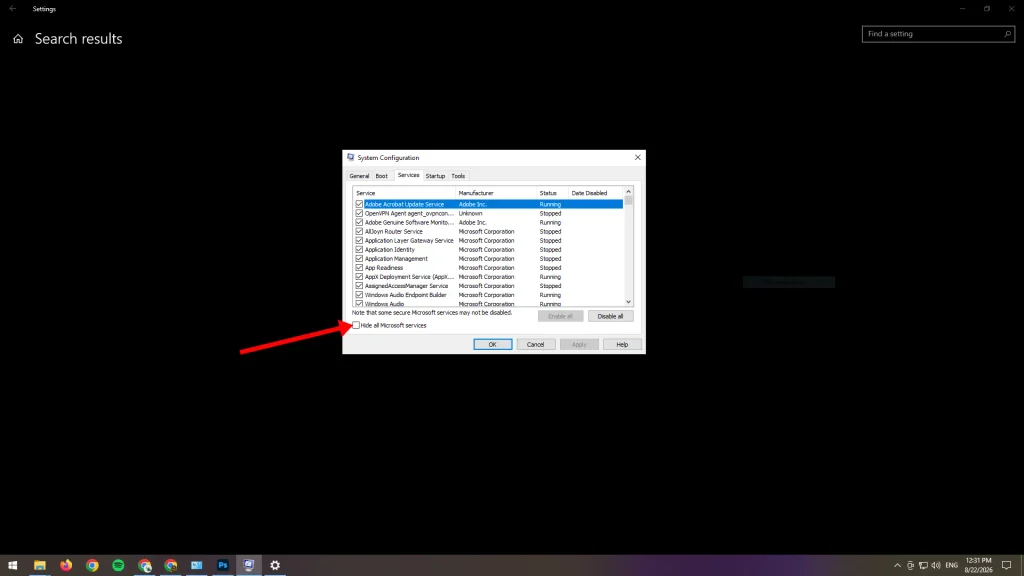
For a lot of players, it cleared up on its own with no fix needed, which points to a server-side or build-side cause rather than anything on your end. If it doesn’t self-resolve, try a clean boot: msconfig → Services → check “Hide all Microsoft services” → disable the rest → Startup tab → disable everything → restart.
BSODs and Full PC Freezes (INVALID_KERNEL_HANDLE)
If the blue screen names INVALID_KERNEL_HANDLE, stop playing until you’ve sorted it. This isn’t the game closing on you — it’s one kernel driver taking Windows down with it, and repeated kernel crashes can chew through your Windows install. It also means no WARDOGS patch is going to fix it. Apply the Windows fix above, reboot, and only then launch again.
A normal game can’t blue-screen your PC. Only a kernel driver messing with another kernel driver can, and that’s what’s happening here. WARDOGS runs kernel-level Easy Anti-Cheat, and it’s clashing with KB5121003 the same way it does in other anti-cheat games.
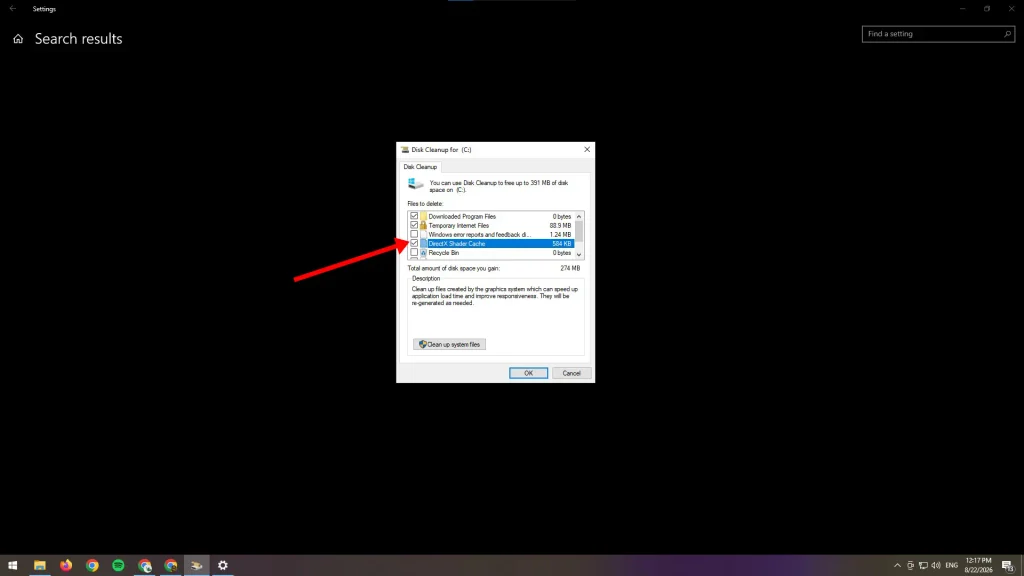
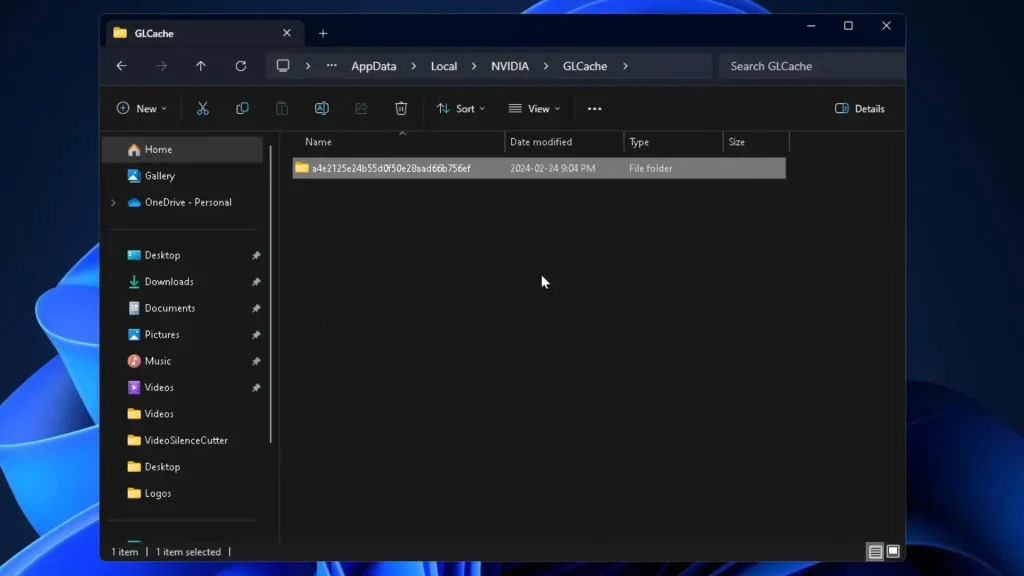
The driver block above clears it. While you’re waiting for it to land, try this instead: clear the NVIDIA cache folders under %LOCALAPPDATA%\NVIDIA (DXCache and GLCache), clear the DirectX Shader Cache (Settings → System → Storage → Temporary Files), reboot twice, and disable the Steam overlay.
On AMD, it’s %LOCALAPPDATA%\AMD\DxCache and %LOCALAPPDATA%\AMD\GLCache. Delete both, then clear the DirectX Shader Cache the same way.
The Full Crash Reset Sequence
If nothing above worked, this is the most complete fix sequence around:
- Delete the EasyAntiCheat folder inside your WARDOGS install directory.
- Delete %LOCALAPPDATA%\Wardogs.
- Reboot your PC. This is the step most people skip, and the one most often credited with actually fixing it.
- Verify game files through Steam.
- Launch and let shaders finish compiling before assuming it’s hung.
Still crashing? Check %LOCALAPPDATA%\Temp for dump files starting with “PACKER.” If you find one showing an access violation (0xC0000005), that’s a client-side bug. Reinstalling won’t fix it, so hold off until BULKHEAD patches it.
Quick Fixes Worth Trying
A handful of smaller fixes worth running through if you’re still stuck:
- Whitelist WARDOGS and the EAC service in your antivirus. Kernel anti-cheat drivers often look like malware to heuristics.
- Disable overlays: Discord, Steam, GeForce Experience, MSI Afterburner, RivaTuner. Injection plus kernel anti-cheat is a known launch-failure combo.
- Enable Secure Boot. Kernel-level EAC expects it on, and a handful of launch failures cleared up the moment it was switched on.
- Update your GPU drivers and run WARDOGS as administrator once, so the anti-cheat driver can install properly if permissions blocked it before.
- Using Sogou Input Method? It injects a DLL into every process, which collides with anti-cheat. Switch to Microsoft Pinyin or kill the Sogou process before launching.
If None of This Worked
Grab your dump before you reinstall anything. Check %LOCALAPPDATA%\Temp for files starting with “PACKER” and %LOCALAPPDATA%\Wardogs for logs. Post them on the WARDOGS Steam discussions board or the official Discord along with your GPU, driver version, and Windows build. That’s a real bug report, and it gets read. Check Steam News first, though. If a hotfix went out in the last few hours, half the reports on the board are already stale.
That’s every fix worth running for WARDOGS crashing on PC. Did I miss one? Write them to me in the comments: what got you smoothly on those WARDOGS Towers again?
FAQ
Why is my server browser empty?
Select only one server region instead of several, then refresh. Select a single region instead of several, then hit refresh. The browser comes back empty with multiple regions ticked and fills in the moment you narrow it to one.
WARDOGS support isn’t responding; what do I do?
Use the Steam discussions board or the official WARDOGS Discord. Both get watched during launch week. Email support doesn’t move at that speed.
Should I just refund if it won’t stop crashing?
You’re on Steam’s standard refund terms: under two hours played, within 14 days. Past that, work through the fixes above first, because most launch-week crashes trace back to the Windows driver conflict rather than the game.