

Mortal Shell 2 crashing has been annoying a lot of players lately. Cold Symmetry has already pushed two hotfixes in three days. The good news is that since this is a 2026 trending game, most of the worst crashes have known causes and fixes now. Here’s what’s actually fixed and what still isn’t totally fixed, but has some workarounds.
Disclaimer: This guide is updated to Hotfix 2.0. It may be updated with future releases. Check again later.
What You’ll Read:
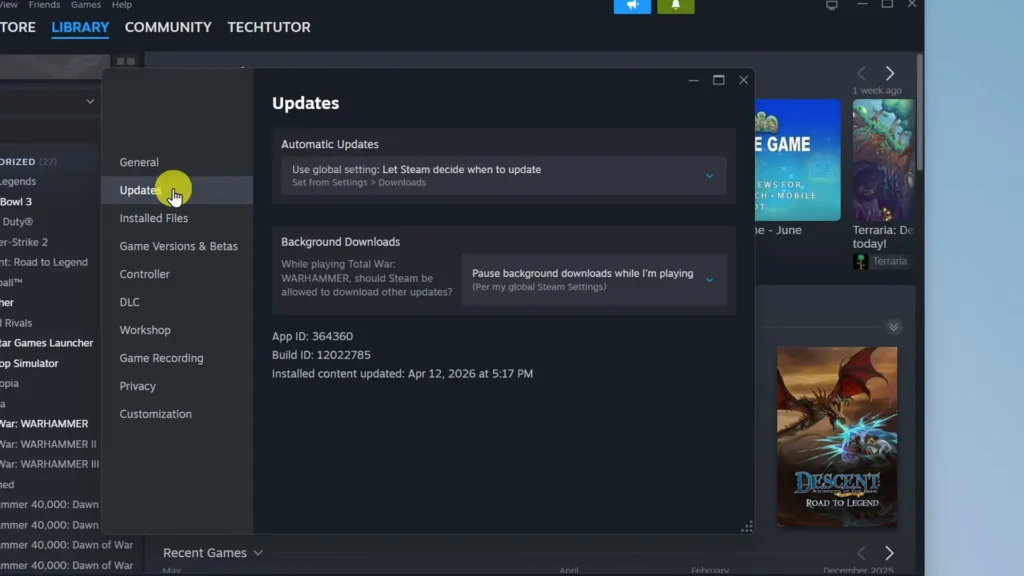
Update to Hotfix 2.0 First
Cold Symmetry has shipped two hotfixes since Advanced Access opened, and if you haven’t restarted Steam in the last day, you’re behind.
Hotfix 2.0 included the following fixes: miscellaneous crash and stability fixes, a fix for the Slayer Seal locking up the UI when equipped from the beacon menu, and a fix for stealing enemy weapons mid-riposte.
Crash When Opening the Keybindings Menu Fix
Cold Symmetry confirmed the game crashes for some players when they open Settings > Keyboard Bindings, and posted this fix for it:
- Close the game.
- Navigate to
\Users\[Your Username]\AppData\Local\MortalShell2\Saved\SaveGames - Back up
EnhancedInputUserSettings.savandSpartaGameSettings.savsomewhere safe. - Delete both files.
You’ll have to redo your keybinds and settings preferences, but that beats a crash every time you open the menu.
When Does Mortal Shell 2 Crash? (Full Trigger List)
Different triggers point to different bugs, so knowing which one you’re hitting matters more than running through a generic fix list. Reported crash triggers as of Hotfix 2.0:
- On launch, during shader compilation
- Opening the Keyboard Bindings menu (has an official fix, see above)
- During the loading screen after death, or a hang at the end of it
- On teleport, newly common since Hotfix 2.0
- Loading a save (throws an Unreal Engine error)
- Leaving a cleansed beacon
- Taking a hit in combat
- On the level-up screen
- During NPC conversation
- Interacting with a chest
- Specific locations: the Forgotten Crossbow area on Xbox Series S, village areas on Series X, a traversal sequence on PS5 Pro, a Tiel-related dungeon on PC
- Idle, standing still, or in beacon menus
- Closing the game
If your crash matches one below, jump to that section.
Turn Off DLSS Frame Generation
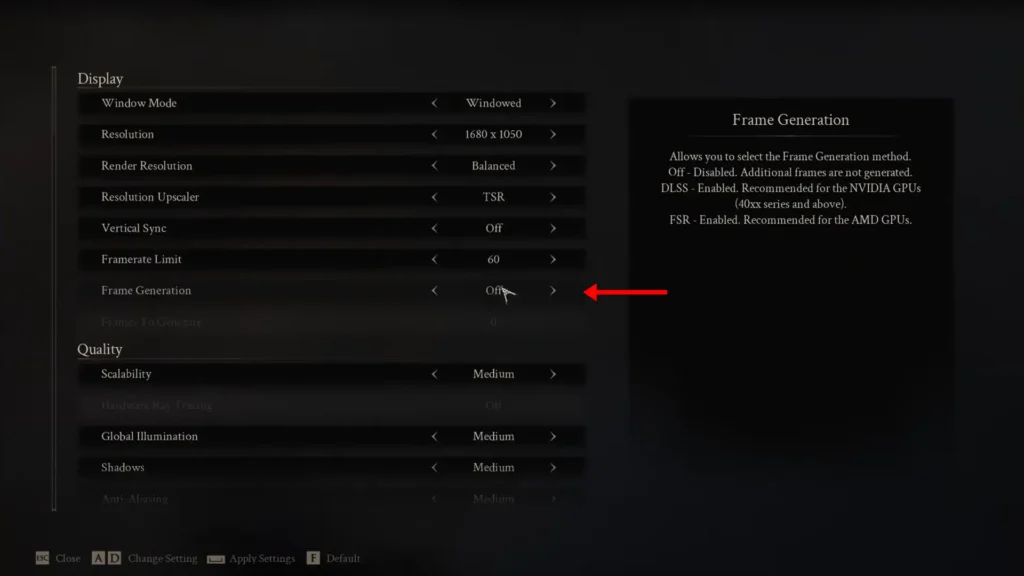
One player on the Hotfix 1.0 thread traced their crashes to DLSS Frame Generation. NVIDIA’s own launch article confirms Frame Generation is a real rendering path in the retail build, not something bugged into existing, but it doesn’t claim toggling it fixes anything.
Treat it as a diagnostic, not a cure. Go to Frame Generation in the graphics menu and turn it off. If your crashes stop, you’ve found your trigger. If they don’t, at least you’ve ruled one thing out.
Limit Your Frame Rate to 60
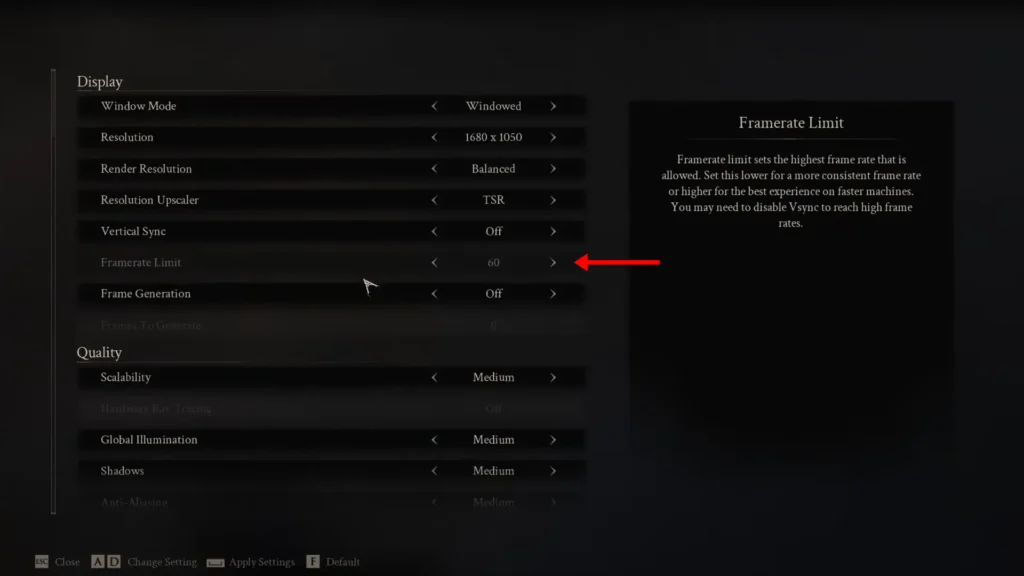
Some players report that a 60 FPS limit solved most of their problems, calling it the first change to make. It’s not proof for the retail build, but two independent tests landed on the same number. So it’s worth taking seriously.
Set the Framerate Limit to 60 in the graphics menu. While you’re in there, I’d also recommend Global Illumination, Shadows, Textures, Visual Effects, Reflections, and Environment on Low, Vsync off unless you’re getting stutter, and Seamless Dungeons Loading off, since so many crashes cluster around loading and transitions.
Crash During “Compiling Shaders” Fix
If the game freezes or crashes while the Compiling Shaders bar is running at launch, you’re hitting a confirmed Oodle decompression error. The exact string players are seeing:
Could not decompress shader group with Oodle
Cold Symmetry has acknowledged this in the thread and logged it with the team; this player was on an i9-14900K and RTX 4070 Super, so it’s not a low-spec issue. Reinstalling didn’t help them. Two fixes exist, both with real disadvantages:
- Windows 8 compatibility mode on the executable stops the crash but causes some stutter.
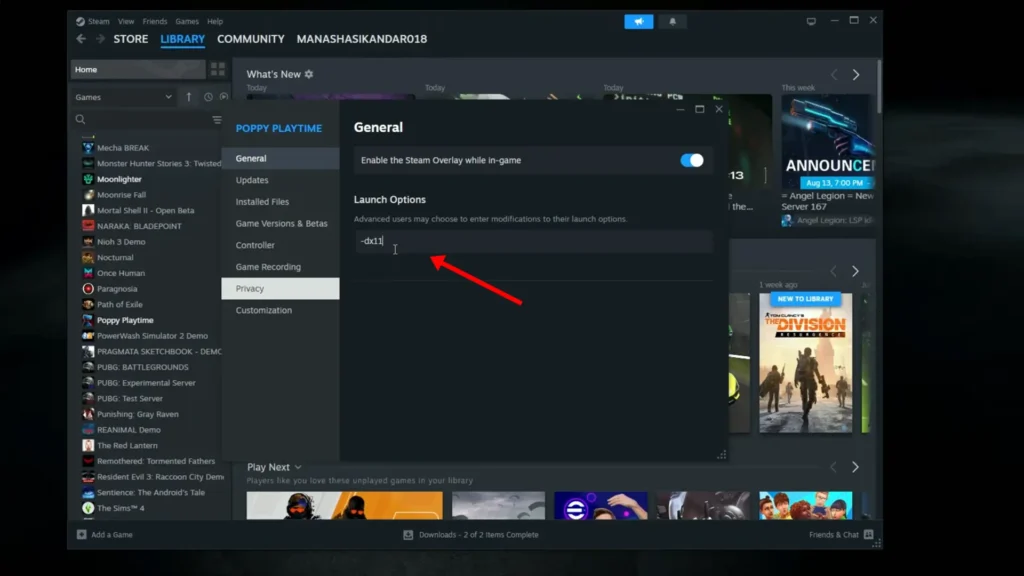
- Launching with
-dx11also stops it, but breaks level geometry visibly.
Neither is a real fix; they’re stopgaps until Cold Symmetry patches the Oodle issue directly. Sometimes, just letting compilation retry several times gets it through without either workaround.
D3D12 GPU Crash Dump
If your crash reporter shows “GPU Crash dump Triggered” with a callstack running through FD3D12DynamicRHI::TerminateOnGPUCrash, you’re looking at this signature.
Forcing DX11 stopped the crash for the original reporter, but a second player got artefacting instead and couldn’t use it; they were on Proton, so Linux and Deck users hit this too. Cold Symmetry confirmed a hotfix shipped targeting this crash, but two players reported it happening again afterward. DX12 is still the published requirement, so don’t treat DX11 as an official fix, just a last-resort test.
EXCEPTION_ACCESS_VIOLATION Crashes
This is a separate crash signature from the D3D12 one above, and the cause is still unresolved. The error reads “EXCEPTION_ACCESS_VIOLATION reading address 0x00000000000002c8,” with MeshComponent::BeginDestroy and GarbageCollection showing in the stack. If your PC crashes across other Unreal Engine games too and you’re on 13th/14th Gen Intel, Intel’s BIOS instability guidance is worth a look, but that’s a separate check, not a Mortal Shell 2 diagnosis.
One player got past a scene by disabling Frame Generation and ray tracing and capping FPS, then crashed again later anyway. Worth trying; don’t expect it to hold.
Verify Integrity of Game Files
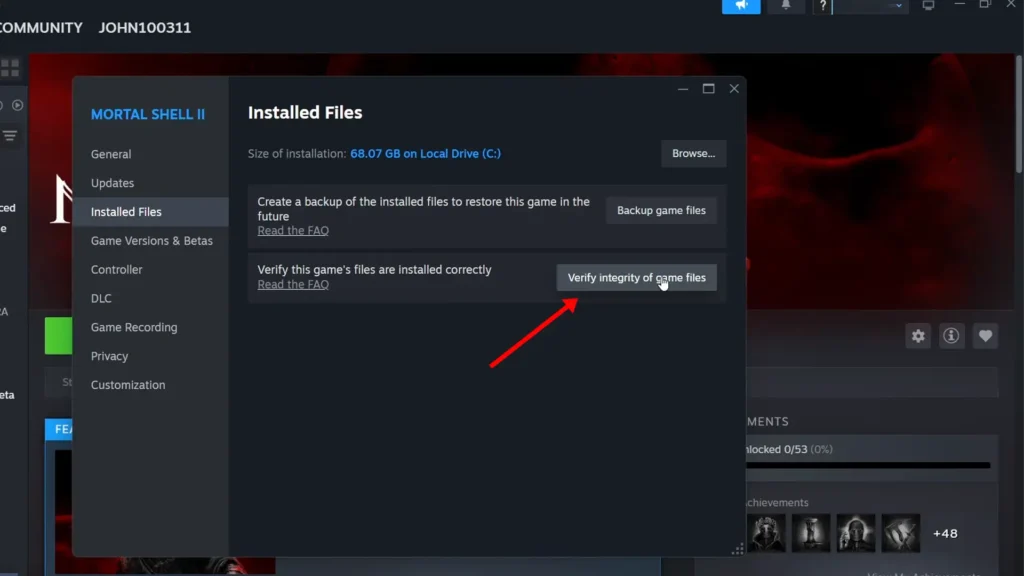
Right-click Mortal Shell 2 in your Steam library, go to Properties > Installed Files, and run Verify Integrity of Game Files. It checks your local install for missing or corrupted files, which is worth ruling out early since it’s free and low-risk.
Just don’t expect it to fix anything above. It can’t touch an engine-level bug, a developer-side crash, or a location-specific one. If it comes back clean, that’s not good news exactly; it just means the problem’s somewhere Steam can’t check.
Console and Steam Deck Crashes
Console reports are more location-specific than PC’s. Xbox Series S has a reproducible crash when entering the Forgotten Crossbow area, bad enough to block progression. Series X crashes on the dashboard near village areas. PS5 Pro has repeated crashes around a particular traversal sequence. Unfortunately, none of these have a player-side fix yet.
Steam Deck is holding up better than you’d expect: Steam Deck HQ found it stays around 30 FPS in combat, with only occasional stutters in crowded areas, and no setting changes needed. That said, Proton users aren’t fully in the clear; one of the D3D12 crash reports above came from a Proton user, so the Deck runs it well but isn’t immune.
If you’re stuck in a locked arena on console (an issue from the beta), the dev-quoted fix was opening the menu and choosing Restart, which respawns you at the last beacon without losing dungeon progress. Unconfirmed for retail, but it’s the only console-specific fix there is.
How to Report a Crash So It Gets Fixed
There is a specific checklist Cold Symmetry wants when you report a crash, and using it means your report actually gets looked at instead of buried:
- Game version (bottom-right of the pause menu)
- Whether it’s reproducible
- Platform
- Bug type (select Crash)
- Screenshots or video if you have them
Add the exact Unreal Crash Reporter text if one popped up, and note what you were doing: dying, loading, teleporting, opening a menu, opening a chest, or entering a specific area. That last detail is what turns a vague “it crashed” into something the dev team can actually chase down.
Other Things Worth Trying
None of these are confirmed fixes for Mortal Shell 2 specifically, but they’re common troubleshooting steps for Unreal Engine 5 crashes and low-risk to try:
- Update your GPU driver, though one player confirmed this alone didn’t stop their crash.
- Clean driver install with DDU if a normal update doesn’t help.
- Disable the Steam overlay.
- Set NVIDIA shader cache size to unlimited.
Skip anything claiming a specific percentage improvement, a confirmed memory leak, or telling you to use launch arguments like -UseFixedTimeStep or disable Control Flow Guard. None of that is verified, and some of it can cause other problems.
And that’s how you fix Mortal Shell 2 crashing. Are there any solutions I missed? Let us know in the comments below.
FAQ
Will the August 20 full release fix the crashes?
Unconfirmed, but likely at least partially. Cold Symmetry has shipped two hotfixes in three days, so a launch-day build or a Hotfix 3.0 wouldn’t be surprising.
Is Mortal Shell 2 crashing on PS5 and Xbox too?
Yes. Console crashes are more location-specific than PC’s, tied to particular areas rather than general instability, and there’s no player-side workaround yet.
Is my PC too weak if I meet minimum spec?
Meeting minimum spec doesn’t guarantee stability. Current crash reports are coming disproportionately from high-end rigs; this isn’t a low-end hardware problem.